Selecting the Highlight option by right-clicking in the main Hyperview window, or by using the Toolbar will bring up the following options:
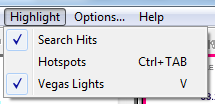
- Search Hits: With this option checked, search hits are highlighted on the document.
- Hotspots: Highlights all the hyperlinks on a page. This is useful for determining the location of hyperlinks in a textual or graphical display.
- Vegas Lights: With this option checked, a colorful marquee will appear to highlight your target.
See also
- Highlighting hotspots
- Highlighting the target hotspot with "Vegas Lights"
- Highlighting various types of hotspots
- Highlighting search hits