When you choose to rebuild, BuildPlus will automatically check the search paths specified in the Configuration Wizard for new graphics folders.
New Graphics Folders Selections
If new files or folders are detected, they will be listed for you and you will be asked if you wish to include them in your present build.
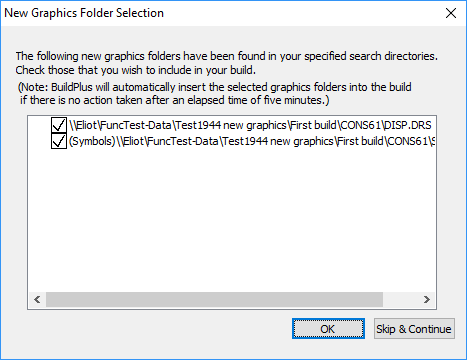
All new files/folders will be automatically checked for inclusion in the build. Uncheck the box to the left of the selection to exclude it from the build.
If no action is taken within five minutes, all newly found graphics folders will be automatically included in the build.
If you wish to make changes to your module or graphics selections after finishing the Auto-Detection process, you will need to restart the build from the Wizard stage.
New 800xA Selections
This dialog may appear when new graphics or submodels folders have been extracted from 800xA files into PPA1 folders in your project directory, and allows you to choose whether they are graphics or submodels:
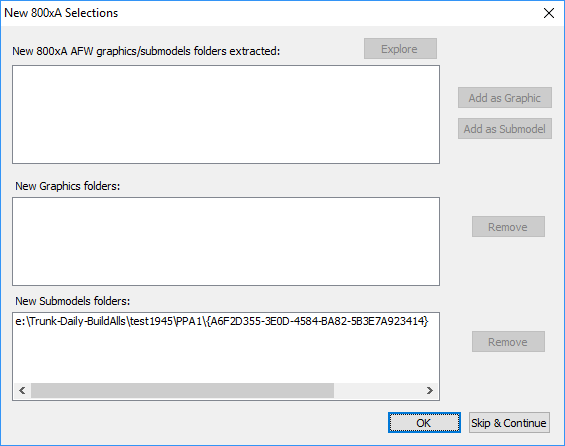
The top window lists any 800xA folders found, that need to be categorized as graphics or submodels. The bottom two windows list BuildPlus automatic choices about graphics and submodels folders.
- To modify the choices in the lower two boxes, select a folder by clicking on it, and click Remove to move it temporarily to the top box.
- To move a folder from the top box, select it, then you may Explore to the source of the folder, or Add as a Graphic or Add as a Submodel.
This box will time out after 5 minutes of inactivity, and proceed with the build. Folders extracted from 800xA may be selected or delected later using Project Wizard.
See also