About "System" data
As of DBDOC 11.6, there is the ability to build bookmarks, annotations, and home pages into the project file. This can be done by the DBDOC admin as part of the build process. These items will then be available to any DBDOC user viewing this DBDOC file. DBDOC project files are generally built centrally, and then made available to multiple users in a shared folder. All these users will be able to see the System data items built into the project file.
For information on how to build System data into the project file, see Creating System Home Page, Text Annotations, Live Loop Annotations, and Bookmarks.
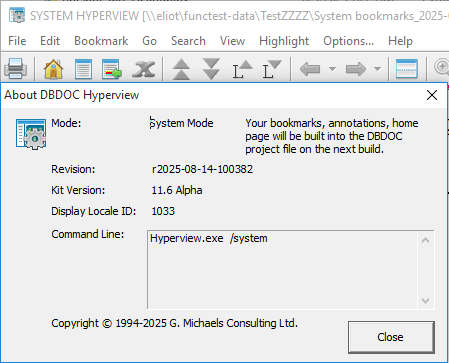
When you are in "System" Hyperview, a gear icon will be added on top of the regular Hyperview icons. This will be visible on the desktop toolbar, on the title bar of Hyperview (this will also show "SYSTEM HYPERIVEW" before your project name), and in the "About DBDOC Hyperview" dialog.
Types of System data
- System Annotations (both text and live loop) -- by default these show up in Hyperview in a cyan color, and can't be deleted.
- System Bookmarks -- if present these are shown in the Hyperview bookmarks menu. See Defining bookmarks centrally with System bookmarks for more information.
- System Home Page -- if present, and if the user has not defined a home page, this centrally defined home page is available.
See also
- Managing Project Files and Locating Original Documents
- Closing the project file
- Finding the original file location of a topic built into the project file
- Opening a project file
- Opening recent project files
- Viewing the Hyperlink compiler version and project file build date and contents
- About DBDOC project files (.dbdoc and .M14)
- Importing user data files from a different project