On the main menu, click Bookmarks.
A panel appears that lets you configure add, modify, and delete bookmarks. Click on any bookmark in the Bookmarks: table to display it in the browser. You can also "export" the bookmark by clicking Show in Tab. This will open a new tab with the URL to the bookmark in question.
Bookmark URLs can copied to other browsers and machines, included in emails etc, and provide a convenient way to communicate a particular location in a DBDOC file.
A bookmark can be made as a "System" bookmark so that other users will be able to access and use it. See Defining bookmarks centrally with System bookmarks.
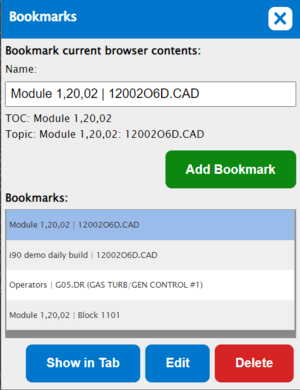
- Add Bookmark: Add the current browser contents as a bookmark.
- Name: Specify the name for the bookmark to be added.
- Bookmarks: Shows a list of all the bookmarks that have been added. Click on a bookmark entry to display it in the browser.
- Show in Tab: Opens a new tab with the contents of the currently bookmark.
- Edit: Modify the name of the currently selected bookmark. A text editor will open in place, in the table.
- Delete: Delete the currently selected bookmark.
See Also
- Getting online help
- Setting home pages
- Displaying your home page in the browser
- Displaying the main Table of Contents
- Synchronizing the index pane to the pane with focus
- Opening the menu
- Basic functionality
- Guide to Hyperview in a Browser