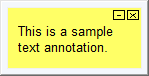
Text annotations are like sticky notes that you can attach to the CAD or CLD sheets, AutoCAD or MicroStation drawings, graphics, text documents, and ladder rungs in your system. They can help you to keep track of questions, ideas, instructions, and reminders, and point out important features of your system.
Text annotations are automatically saved, and will still be attached to the documents where you created them the next time you open Hyperview, even if you switch to a new build of your system.
Use text annotations to:
- Record instructions for analyzing a document in your system.
- Point out important features of any Hyperview document.
- Jot down ideas, reminders, or any other notes.
System annotations
DBDOC 11.6 supports the ability to build centrally defined annotations into the dbdoc file -- "System" annotations. By default, these have a different color from the preexisting "User" annotations. System annotations can't be deleted by non-System users, but they can be minimized via the context menu, or by setting project options.
See Creating "System" Home Page, Text Annotations, Live Loop Annotations, and Bookmarks for information about creating System annotations.

See also
- Creating a text annotation
- Editing a text annotation
- Positioning and resizing a text annotation
- Copying a text annotation
- Deleting a text annotation
- Changing the appearance of text annotations
- How to find a text annotation if you forget which document it's in
- How to move a text annotation to a different document
- Managing live loop and text annotations in the Annotation Manager
- Unicode control characters for text annotations
- Importing text annotations