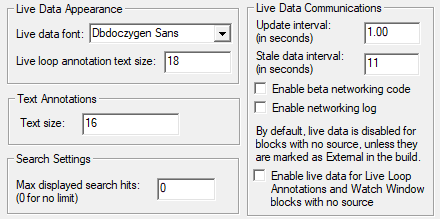
To select the font and text size of all live loop annotations in your system:
- Open the Options… menu and select the View tab.
- Select the font and text size you want from the Live Data Appearance box.
To select the color of all live loop annotations in your system:
- Open the Options… menu and select the Colors tab.
- Specify a color for live loop annotations.
See Changing colors on display for more information.
See also
- Editing live loop annotations
- Creating live loop annotations
- Positioning live loop annotations
- Copying live loop annotations
- Deleting live loop annotations
- Interpreting text and symbols on live loop annotations
- Adding a live loop annotation to the watch window
- Finding a live loop annotation if you forget which document it is on
- Moving a live loop annotation to a different document
- Live Data Options For This Block dialog
- About live loop annotations
- Managing live loop and text annotations in the Annotation Manager
- Importing live loop annotations