Importing one project
On the Tools menu, click Import and then Import Project.
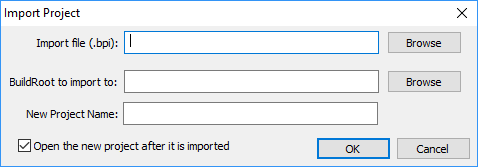
This option creates a new project from a BuildPlus import file (.bpi), as created with Export Project.
You will need to enter the location of the import file, the BuildRoot to create the project in, and a name for the project.
Instead of exporting a project to create a .bpi file, as of DBDOC version 10.4.2, when a project is built,
- the file
projectname_archive.bpiis automatically created in the project folder if BuildRoot option Archive Project Error Files is off, or - the file
projectname_archive_date.bpiis automatically created in the dated error folders if BuildRoot option Archive Project Error Files is on.
If the project that was exported used UNC paths (e.g. \\datacomputer\sharedfolder), then you should be able to build the new project by opening it and clicking the Build button.
If the paths are changed from what was originally exported, you can edit the .bpi file before importing with a search+replace in your text editor of choice. Make sure, however, that it does not add a byte-order mark (BOM) to the start of the file, and this will cause BuildPlus to disbelieve the validity of the .bpi file.
Importing multiple projects
If you need to import multiple projects at once, please see "Importing BPI files via the command line", or else move some or all the projects in a BuildRoot
See also
- Creating a new project or opening an existing project
- Opening a recent project
- Deleting a project
- Cleaning up temporary/intermediate files
- Exporting a project
- Renaming a project
- Moving a project
- Cloning a project
- Changing Project Options
- Creating Project Settings Archive
- Recover Projects
- Copying project .bpi files to back-up location