On the Search Menu, click Full Text Search (shortcut Ctrl+F), or click the  button on the toolbar.
Overview of Full Text Search
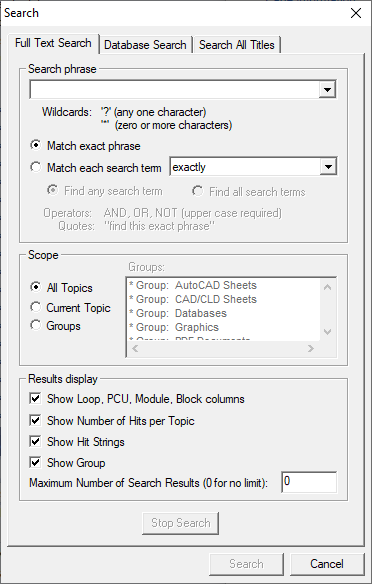
The Full Text Search menu item searches for an arbitrary word or phrase. DBDOC's search mechanism makes it possible to quickly locate information in the DBDOC title, even if it hasn't been indexed.
Search options
- Search phrase: Enter the search item here.
- Match exact phrase: Searches only for exact matches to the phrase entered above. Functions the same as entering quotation marks around a phrase.
- Match each search term: Searches for each word entered above individually. You may choose to search for each search term exactly, to the beginning of a word, to the end of a word, or to any part of a word.
- Find any search term: Equivalent to putting OR between the terms in Match each search term mode. Does nothing in Match exact phrase mode.
- Find all search terms: Equivalent to putting AND between the terms in Match each search term mode. Does nothing in Match exact phrase mode.
- All topics: Searches the entire system.
- Current topic: Searches the topic currently displayed in the browser.
- Groups: Searches only certain categories, chosen from the menu on the right.
- Results display: Choose which sortable columns to display in the Search Results dialog box.
- Show Loop, PCU, Module, Block columns: Displays the LPMB of each search result.
- Show Number of Hits per Topic: Displays the number of occurrences of the search term in each document.
- Show Group: Displays the topic's group name in a sortable column.
- Show Pane: Displays which pane the result is displayed in.
- Show Hit Strings: Displays the context in which a search hit occurs (i.e. surrounding text). This can make a search slower, so only check it if you need to know.
- Stop Search button: Cancels the current search, without ending the dialog box.
- Search button: Starts the search.
- Close button: Dismiss the dialog box.
When you search for a word or phrase, all documents containing the word or phrase are listed in a Search Results dialog box (see Viewing search results). Within each document, all occurrences of the word or phrase are highlighted to stand out. If you like, you can change the search hit color. Use the Next Highlight button  and the Previous Highlight
  button on the tool bar to step through all of the search hits in any document. If no search hits are found, you will see a dialog box similar to the following:
When no results are found
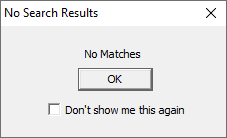
This will appear to let you know that Hyperview was not able to get any hits that matched your search criteria. If you do not wish to see this dialog box each time then check the Don't show me this again option before clicking OK to dismiss the dialog. To reset this option so that the message appears again you can go to the View tab of the Options Menu and check the Reset to show all suppressed dialogs option.
Search operators, wildcards, and handling of non-alphanumeric characters
Operators
You may insert the operators OR, AND, or NOT between the words you want to search for, and you may use parentheses to group words in your search phrase.
Note that words in square brackets, for example, [search term], represent the search term exactly as you should type it.
Note also that operators are only interpreted if Match each search term is the selected search mode. Otherwise the operator will just be treated as regular text.
- [x OR y] searches for documents containing x or y, or both.
- [x AND y] searches for documents containing both x and y.
- [x NOT y] searches for documents containing x but not y.
Parentheses can be used to group terms together much in the same way as parentheses are used in logical expressions.
(A OR B) AND (C OR D) will search for documents containing either A or B and either C or D.
Wildcards
You may include the wild cards * and ? in any word, in both Match exact phrase and Match each search term modes. * matches zero or more alpha-numeric or underscore characters. ? matches a single alpha-numeric or underscore character. Note that these wildcards do not match spaces. There is no restriction on the placement of wildcard characters in a word: they may appear initially, medially and/or finally unless there are quotations. Here are some examples of wildcard usage:
- [?hen] matches when and then.
- [err*] matches err and error.
- [cl?ck] matches click and clock.
 Note: A search term with a wildcard as the first character will take much longer than if no wildcards are present or if wildcards are present in other positions.
Non-Alphanumeric Characters
When searching, Hyperview currently treats the following characters as if they were regular alphanumeric characters: + - / @ _ %. So you can search for [@] or [@AB] or [A/B] and will find those exact strings if they exist.
The characters : ; . , & (and others not specified) are treated as whitespace in a text search. So if you search for [A&B], you may find "A, B" as a search result.
See also
- Searching for a block or tag in the database
- Searching document titles for a topic
- Search For Selection
- Clearing Search Hits
- Viewing search results
- Viewing previous search result in a full text or database search
- Viewing the next search result in a full text or database search
- Viewing previous hit in a search result topic
- Viewing next hit in a search result topic
- Highlighting search hits
- Searching the System and Navigating Search Results