In order to add a new Hyperview Service, press Add Service... on the main interface of the Hyperview Service Controller. The following dialog appears:
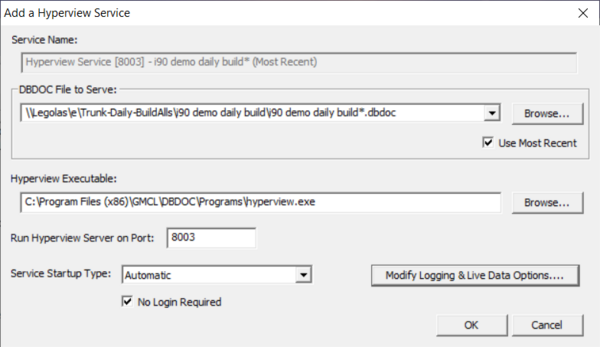
In order to add a service, you must specify a project file to serve, a Hyperview executable to run as a service, and the port on which the project file is to be served by the service.
- Service Name: This is the name that will be given to the service. You will be able to see it in (for example), the Windows Services utility. The name is automatically generated from the project filename and port that you choose.
- DBDOC File to Serve: This is the project file that is to be served by the Hyperview Service. Note that in general, the project file must be on the same machine as the Hyperview Service (i.e. the machine you are currently on). There are usually restrictions on allowing the Local System user (the virtual user that runs services) from accessing network filesystems. Moreover, for best performance, it makes sense to have only one network hop (the one between Hyperview in a Browser and the Hyperview Service) in the system.
- Use Most Recent: If you check this box, this service will serve the most recent DBDOC build for the specified project. You should check this box if you build new project files regularly, and want to be serving the most recent one. Note that the Hyperview Service will need to be restarted in order to load up the newest project file. There is a command line interface for doing this, if you wish to incorporate it into your regular build process.
- Hyperview Executable: This is the hyperview executable that will be acting as a service. A hyperview.exe from at least DBDOC 11.3 is required.
- Run Hyperview Server on Port: This allows you to specify the port for the hyperview service to use.
- Enable HTTPS: This allows you to choose whether or not your hyperview service uses HTTPS.
- Restart Service Automatically: These are the options as to how the service should be handled when the machine restarts. There should be little reason to choose anything but one of the automatic modes After reboot and unexpected service stop or After reboot only here
- After reboot and unexpected service stop: the default option, this causes the service to be automatically restarted if the machine reboots, or if the service crashes. Only two attempts will be made to automatically restart the service after an unexpected stop (crash). If the Hyperview service fails again quickly both times, it will need to be restarted manually.
- After reboot only: This is the same as the previous except the service will not restart after a crash.
- Never (service must be started manually): The service will never restart automatically. You would need to restart it explicitly from the Hyperview Service Controller if it stops.
- Disabled (service does not run): Means that the service cannot be started.
- No Login Required: If this is checked (the default), then there is no login required to view a Hyperview page served by the Hyperview service. An account based on IP is automatically created, and used to keep track of things like whether Specs are shown, which are particular to each user. This No Login Required mode is convenient, because it allows links to particular Hyperview "web pages" to be shared and used generally within a particular network context. If No Login Required is not checked, then users must log in with username and password in order to view Hyperview pages.
In order to modify an existing Hyperview Service, select a service and press Modify Service... on the main interface of the Hyperview Service Controller. After the service is modified, it will automatically be restarted so that any changes take effect.
See Also
- Setting up a Hyperview Service
- Configuring your Hyperview Services setup
- Running the Hyperview Service Controller
- Starting and stopping Hyperview Services from the command line
- Accessing Hyperview Services through a firewall
- Managing Hyperview Service log files
- Finding Hyperview Service user data files
- Guide to Hyperview in a Browser