General setup for all Hyperview Services
Before you can create a Hyperview Service, you must set up a few things. Press Setup on the main interface of the Hyperview Service Controller. The following dialog appears:
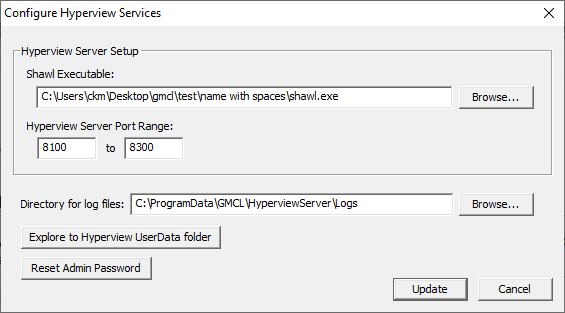
Hyperview server setup
The following two items need to be set appropriately in order to create Hyperview Services.
- Shawl Executable: This is a wrapper application that allows Desktop Hyperview to run as a service. It should be located in your DBDOC Programs folder. Make sure that the proper path to shawl.exe is specified here.
- Hyperview Server Port Range: This is where you specify the ports that a Hyperview Service can use. You can choose one port, or a range of ports. Each service can only serve one project file on one port, so if you want to serve more than one project file simultaneously, more than one port should be specified in the range here.
 Note: The ports specified here constrain where Hyperview Service Controller can put Hyperview services. However, you will additionally need to make appropriate holes in your machine's firewall for the ports specified here -- this is not done automatically.
HTTPS Settings
If you would like to serve your Hyperview Service over HTTPS you can configure the service controller to do so here. You can either specify your own certificate and key files, or use the option to generate self-signed ones.
- Private HTTP Port Range: This is where you specify the ports that a Hyperview Service can use when HTTPS is enabled.
- FQDN: This lets you choose a domain name other than the default. The default domain name will be used if the field is left empty, and is shown below.
- Certificate File: This is where you must specify the location of your certificate file if you choose to use one.
- Key File: This is where you must specify the location of your key file if you choose to use one.
- Generate self-signed certificates: Use this option if you want to skip using your own certificate and key files and have them generated for you. When this option is checked, the certificate and key fields will be disabled.
- Start Caddy: This button starts the Caddy service for HTTPS. If Caddy is already running, it will be disabled.
- Stop Caddy: This button stops the Caddy service for HTTPS. If Caddy is not currently running, it will be disabled.
Other setup information
- Directory for log files: This is where you will find Hyperview Service log files. You can specify a different location if you wish.
- Explore to Hyperview UserData Folder: When Hyperview is running as a service, it stores its datafiles in this location. This location is analogous to the user data folder used by Desktop Hyperview (usually
C:\Users\<user_logon>\AppData\Roaming\GMCL\DBDOCfor desktop users), but stores information for all the users connected to a particular Hyperview Service. - Reset Admin Password: Revert the Administrator password to its installation setting. When you view the Hyperview website (Hyperview in a Browser), there will be a login. There is a preset Administrator account with an installation password. Once logged in, the Administrator user will be able to change the Administrator password, and create other user accounts via the Hyperview in a Browser interface. If the Administrator password is lost, it can be reset to the initial installation password here. Please contact GMCL for the reset installation Administrator password.
See Also
- Setting up a Hyperview Service
- Adding or modifying a Hyperview Service
- Running the Hyperview Service Controller
- Starting and stopping Hyperview Services from the command line
- Accessing Hyperview Services through a firewall
- Managing Hyperview Service log files
- Finding Hyperview Service user data files
- Guide to Hyperview in a Browser