Log file location
In the Hyperview Service Controller, click on Explore to Log Files to explore to the folder where log files for Hyperview Service Controller, and also for individual Hyperview Services are kept.
You can change this location in the Configure Hyperview Services dialog.
Log file names
The Hyperview Service Controller log is called
HyperviewServiceController_<date>.log.
Hyperview Service logs are given a unique name based on the project the service is service, the port it is serving it on, and the date and time:
<project>_<port>_HyperviewServer_<date>-
For example,
Test project_8888_HyperviewServer_2022-01-17-16-20-26.log
Logging options
Hyperview Service Controller logs
The log for the Hyperview Service Controller has no optional settings. One new log starts on each day that Hyperview Service Controller runs.
Hyperview Service logs
You can choose logging options for Hyperview Services by clicking on Modify Logging Options... in the main Hyperview Service Controller window, or in the dialog for adding or modifying a Hyperview Service. The options shown will apply to the currently selected Hyperview Service (in the Hyperview Services list).
The options for each service are specified individually. So, for example, you could have a debugging Hyperview Service that logged all data communications, and a regular service that did not.
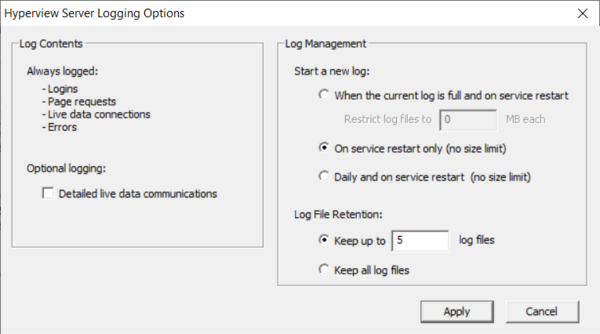
Log Contents
By default, most Hyperview Service activities, such as logins, page requests, making and breaking live data connections, and errors are logged.
Optional logging
- Detailed live data communications: Check this box if you want all data communications between a Hyperview Service and CIUMon to be logged. Be default, only connection status change and periodic status updates are logged.
Log Management You have several options about when new Hyperview Service logs should be started.
Start a new log
- When the current log is full and on service restart: This mode will only create a new log file when the Hyperview Service is restarted, unless a maximum size has been reached, in which case a new log file will be created sooner.
- Restrict log files to N MB each: Specify the maximum log file size here.
- On service restart only (no size limit): A new log file will be created only when a Hyperview Service is restarted. This is probably not a mode to use if Detailed live data communications is checked.
- Daily and on service restart (no size limit): A new log file will be created every day, as well as when a Hyperview Service is restarted.
Log File Retention
- Keep up to N log files: Specify how many log files to keep. Especially if a new log file is being started daily, you may want to prevent hundreds of files from being created over time. If the limit is exceeded, the oldest log file will be automatically deleted.
- Keep all log files: If this is specified, no log files will be automatically deleted.
Live Data Options
- Force Snapshot Mode Live Data: Checking this option disables continuous mode (clock) for live data, and only allows Web Browser Hyperview to use Snapshot/Slow mode (camera) for live data. The clock icon on the toobar will be greyed out, indicating that this option is inactive and continuous data is turned off.
See Also
- Setting up a Hyperview Service
- Configuring your Hyperview Services setup
- Adding or modifying a Hyperview Service
- Running the Hyperview Service Controller
- Starting and stopping Hyperview Services from the command line
- Accessing Hyperview Services through a firewall
- Finding Hyperview Service user data files
- Guide to Hyperview in a Browser