General Print Options
On the File Menu, click Print... (shortcut Ctrl+P) or click the  button on the toolbar to print the current topic.
This function prints a copy of the topic currently displayed on the screen. The standard File Print dialog box appears.
If you specified the Fast Print... option, this dialog will only appear once, and will be suppressed between printing subsequent drawings. Note that other print options can be specified in the Print Settings tab of the Options dialog.
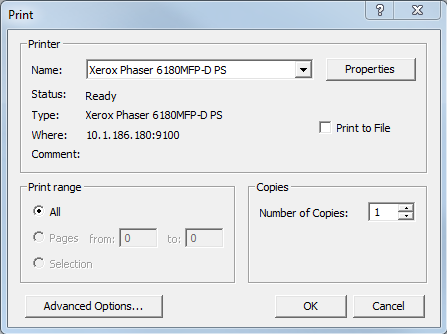
- Printer: The currently selected printer. If you have more than one printer available, you can click on the down arrow on the Name: drop-down list box to select a different printer.
- Properties button: Opens a printer-specific dialog box. This dialog box contains further options, which allow you to configure your output and/or your printer. For help with your printer's options, consult the manuals that came with your printer.
- Print to File: Redirects printer output to a file on disk. This option is handy if you don't have a printer connected directly to your PC and/or you don't have access to a printer on a network. When this option is selected, and you click on the OK button, you will be prompted for a destination (path and) file name. In order to print the PRN files, you will need to create a batch file in your Windows folder containing the line "copy %l lpt<x> where x represents the correct LPT port number (for example, LPT1). You will have to associate PRN or PS file extensions with this newly created batch file. Create a shortcut on your desktop to this file and drag and drop the PRN or PS file to the shortcut when you wish to get a print out of a particular file. For a more complete description of this procedure, click on http://support.microsoft.com/kb/q158081/ to connect to the Microsoft web site for an article on PRN files.
- Print Range: Specify if you want to print the entire topic or the highlighted selection (if you have selected something).
- Copies: Number of copies to print.
- Advanced Options: Launch the advanced options dialog to specify more information about your print request. The name of the document you are about to print is displayed at the top of the dialog.
Advanced Print Options
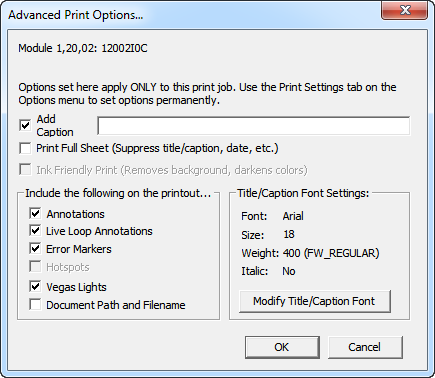
Use this window to set options just for the current print job. Any changes you make in this window will apply to the current print job, but they won't be saved. To make changes to your default print settings that will take effect every time you print, use the Print Settings tab in the Options menu.
- Add Caption: Adds a caption to the bottom of the page that you are printing.
- Print Full Sheet: Suppresses title, caption, date etc.
- Ink Friendly Print: Check this option to have the colors of the printout adjusted to reduce ink usage.
- Print Zoomed Out: Check this option to have the document appear fully zoomed out on your printout (regardless of the zoom level used when marking the document for printing).
- Include the following on the print: Choose from the options listed what you want to have appear on your printed document.
- Annotations: Check this option if you want the annotations that you made on your drawings or graphics to show up on your printout.
- Live Loop Annotations: Check this option if you want the live loop annotations that you made on your drawings or graphics to show up on your printout.
- Error Markers: Check this option to print error markers. They do not print by default.
- Vegas Lights: Displays the current vegas lights highlight on the printout.
- Document Path and File Name: Check this option to add the full document path and file name to the printout.
- Modify Title/Caption Font: Change the type and size of font used for printing the caption.
See also
- Modifying page layout settings for printing
- Printing with initialized settings (Fast Print)
- Printing marked topics
- Marking a topic or group of topics for printing
- Printing documents with text annotations on them
- Changing print settings
- Marking the current topic for printing
- Printing Topics in Hyperview
- Batch printing marked topics